Google Ads works for small businesses in the UK, but most owners set their budget the wrong way round. They start with what they can afford to spend, then hope the leads cover it. The businesses that make Google Ads pay start from the other end: how much one new customer is worth, and how much of that they can give to Google to win them.
This guide shows you how to do exactly that. By the end you will be able to:
- Work out your allowable cost per customer and turn it into a monthly budget (there is a free calculator below)
- See what Google Ads really costs in the UK, and why the "average CPC" figures you find online disagree so much
- Avoid the default settings that quietly drain small budgets
- Spot the point where Google Ads on its own stops being enough
Every figure in this guide is in pounds, every benchmark is linked to its source, and the real campaign numbers come from a UK account we manage.
Summary
- Set your budget from customer value, not affordability. Customer value × the share you will spend gives your allowable cost per customer; divide down by your conversion rates to get your maximum CPC and monthly budget.
- UK clicks mostly cost £1 to £3, but published UK averages disagree by up to three times, so check Keyword Planner for your own keywords and area.
- Budget for at least 10 clicks a day. Anything less cannot tell you whether a keyword works within a month.
- Start with one Search campaign. Leave Performance Max and AI Max until you have about 30 conversions a month; add Shopping if you sell products.
- Fix the defaults before launch: location "Presence", Search Partners and Display off, auto-apply off, phrase and exact match, negative keywords.
- Track real enquiries under UK consent rules with Consent Mode v2, enhanced conversions and call tracking.
- Judge results by cost per customer, without brand searches. In our UK example, the cheapest clicks produced the most expensive leads.
Is Google Ads Worth It for a Small Business in 2026?
Yes, if people already search for what you sell and you know what a customer is worth to you. Google Ads puts you in front of people at the moment they are looking, which is why it usually converts better than social ads for service businesses. It is not worth it when the maths cannot work, however well the campaign is run.
When Google Ads tends to work
- People search for your service by name. "Emergency electrician Leeds" or "bookkeeper for contractors" are searches with a buyer behind them.
- You have healthy margins or repeat customers. The more a customer is worth over time, the more you can afford to pay to win one.
- You can answer leads quickly. Paid traffic is expensive to waste. A call that goes to voicemail at 10am is a lost click you already paid for.
- You serve a defined area. Local targeting lets a small budget compete in a small patch rather than across the whole country.
When it usually doesn't
- Nobody searches for your category yet. New product types need awareness first, and search ads cannot create demand that does not exist.
- Your margins are very thin. If a customer is worth £30 in profit and clicks cost £2, you need a 7% conversion rate just to break even before any other costs.
- Your website cannot convert. No clear phone number, no form above the fold, slow on mobile. Fix this before you spend a pound.
- Your budget buys fewer than about 10 clicks a day. At that level you cannot tell a bad keyword from bad luck, so you cannot improve anything.
A 60-second check
Answer yes or no:
- Do customers search Google for the service you offer?
- Do you know your average job or order value?
- Do you know roughly what share of enquiries become customers?
- Can someone answer calls and forms within an hour during working hours?
- Could you spend enough to buy at least 10 clicks a day for a month?
Four or five yeses: you are ready to test. Two or three: fix the gaps first, starting with questions 2 and 3, because the budget method below depends on them.
How Much Does Google Ads Cost in the UK?
Most UK small businesses pay somewhere between £1 and £3 per click on search ads, but your sector can move that figure by a factor of ten. Budget for two separate costs: what you pay Google for clicks, and what you pay someone (or your own time) to run the account.
UK cost per click by industry
Here is what two UK sources published in 2026 for the same sectors. Look at how far apart they are.
| Industry | Visionary Marketing, avg CPC | Whito, avg CPC |
|---|---|---|
| Legal services | £6.85 | £8.25 |
| Financial services | £7.20 | £5.50 |
| SaaS / technology | £5.40 | £3.65 |
| Healthcare / dental | £2.40 | £2.80 |
| Education / training | £1.20 | £2.40 |
| Travel / hospitality | £1.95 | £1.60 |
| Home services | £1.10 | £3.20 |
| eCommerce / retail | £2.80 | £0.95 |
| Charity / non-profit | £0.65 | £0.85 |
Sources: Visionary Marketing, PPC Cost Forecasting 2026 (stats updated May 2026); Whito, UK PPC Costs 2026 (Q1 2026 search data, page updated November 2026).
Why "average CPC" figures disagree
Home services is nearly three times more expensive in one source than the other. eCommerce flips the other way. Neither source is wrong, they are measuring different things:
- Different samples. One agency's client list is not the market. A portfolio heavy on emergency trades will show higher home services CPCs than one heavy on gardeners and cleaners.
- Different blends. Some figures mix Search with Shopping or Display, which have very different click prices.
- No official UK figure exists. Whito notes that there is no primary UK-wide survey of Google Ads click costs, so every UK range you read is an estimate.
The practical lesson: use benchmarks to sanity-check, never to set your budget. The only CPC that matters is the one Google's Keyword Planner shows for your exact keywords in your exact area, and then the one you actually pay in your first month.
London vs the rest of the UK
Where you advertise changes the price. Whito estimates London clicks cost 15 to 30% more than the UK average, while the rest of England, Scotland, Wales and Northern Ireland usually come in below it. If you serve several regions, prove the campaign in cheaper areas first and expand into London once you know your conversion rate.
Ad spend, management fees and VAT
- Ad spend goes to Google. You set it, and you can pause it at any time.
- Management is separate. UK freelancers typically charge £200 to £800 a month and small-budget agency tiers £500 to £1,500, with setup fees of roughly £250 to £500 (Whito). Always pay Google directly from your own account so you can see exactly where each pound goes.
- Tax on your invoice. Google adds VAT to UK ad spend, which VAT-registered businesses can usually reclaim, plus a 2% "UK DST Fee" that Google has added to invoices for ads served in the UK since November 2020 to cover the Digital Services Tax. Check your billing settings so your budget maths uses the real number, not the pre-tax one.
How to Work Out Your Google Ads Budget (Work Backwards, Not Forwards)
Your budget should come from what a customer is worth, not from what feels affordable. Start with the profit one customer brings in, decide how much of it you are willing to spend to win them, then work down to the cost per lead, the cost per click and finally the monthly budget. Four steps, and you only need numbers you already have.
Example: Manchester electrician (worked through in full below).
Step 1: Work out what a customer is really worth
Take your average job or order value, multiply it by your gross margin, then by how many times a typical customer buys from you. That is the gross profit one new customer brings in.
Use gross profit, not revenue. A £1,000 job with £400 of materials and labour is worth £600 to you, not £1,000.
Step 2: Decide your allowable cost per customer
This is the most you will pay in advertising to win one customer. Pick a share of the customer value you are comfortable giving away. Many service businesses start between 20% and 35%; a business with strong repeat purchases can go higher, a business with thin margins should go lower.
Step 3: Turn it into an allowable cost per lead and a maximum CPC
Not every lead becomes a customer, and not every click becomes a lead. Divide down using your own conversion rates. If you don't know them yet, use a cautious guess and replace it after your first month.
If the maximum CPC is lower than what Keyword Planner shows for your keywords, stop here. Either improve your conversion rate (usually the landing page) or choose cheaper, more specific keywords before spending anything.
Step 4: Set the monthly budget, and the minimum test
Now work out how many clicks you need to hit your customer target, and multiply by your expected CPC.
There is also a floor. You need roughly 10 clicks a day to learn anything within a month, so your minimum test budget is about 10 × your expected CPC × 30. Spend less and you are guessing. Remember that Google can spend more than your daily budget on busy days and balances it out over the month, so set your daily budget at the monthly figure divided by 30.4.
Worked example 1: an electrician in Manchester
| Input | Value |
|---|---|
| Average job | £450 |
| Gross margin | 50% |
| Jobs per customer (repeat work) | 1.3 |
| Share of customer value to spend | 30% |
| Lead-to-customer rate | 40% |
| Click-to-lead rate | 8% |
| Expected CPC (Keyword Planner) | £2.20 |
| Target | 15 new customers a month |
- Customer value: £450 × 50% × 1.3 = £292
- Allowable cost per customer: £292 × 30% = £88
- Allowable cost per lead: £88 × 40% = £35
- Maximum CPC: £35 × 8% = £2.80, comfortably above the expected £2.20, so the maths works
- Monthly budget: 15 ÷ 40% ÷ 8% = 469 clicks × £2.20 = about £1,030 a month
- Minimum test: 10 clicks × £2.20 × 30 = about £660 for the first month
Worked example 2: a B2B software company
| Input | Value |
|---|---|
| Annual contract value | £3,000 |
| Gross margin | 80% |
| Average customer lifetime | 2 years |
| Share of customer value to spend | 33% |
| Demo-to-customer rate | 20% |
| Click-to-demo rate | 3% |
| Expected CPC | £6.00 |
| Target | 4 new customers a month |
- Customer value: £3,000 × 80% × 2 = £4,800
- Allowable cost per customer: about £1,600
- Allowable cost per demo: £320
- Maximum CPC: £9.60, above the expected £6.00
- Monthly budget: 4 ÷ 20% ÷ 3% = 667 clicks × £6.00 = about £4,000 a month
The same method gives very different answers, which is the point. A generic "spend £500 to £2,000 a month" range would have underfunded the software company and possibly overfunded a trade with low margins.
Try it with your own numbers
Allowable CPA & Budget Calculator
Your expected CPC is higher than your maximum CPC, so these keywords would cost more than a customer is worth to you. Improve your landing page conversion rate or choose more specific, cheaper keywords before you spend.
Your expected CPC is below your maximum CPC, so the maths works. Start with at least the minimum test budget and replace the estimates with real figures after your first month.
Which Campaign Type Should a Small Business Start With?
Start with a Search campaign. It shows your ad only to people typing in the words you chose, you control the keywords and the message, and you can see exactly which searches cost you money. Every other campaign type hands more of those decisions to Google, which works well with lots of conversion data and badly without it.
| Campaign type | Best for | Sensible starting budget | Your control | Verdict for most small businesses |
|---|---|---|---|---|
| Search | Services and products people search for | Your minimum test budget (Step 4) | High | Start here |
| Local Services Ads | Eligible local service categories | Pay per lead | Medium | Test alongside Search if you qualify |
| Shopping | Product businesses with a Merchant Center feed | Similar to Search | Medium | Essential if you sell products online |
| Performance Max | Businesses with steady conversion volume | Higher; needs data to learn | Low | Wait until you have about 30+ conversions a month |
| Demand Gen / Display | Awareness and remarketing | Varies | Medium | Not a lead generation starting point |
Search first
A well-built Search campaign is the cleanest test of whether Google Ads works for you. Keep it to one service, a handful of tightly themed ad groups and a landing page that matches the ad.
Local Services Ads
In categories where they are available, Local Services Ads charge per lead rather than per click and show a verified badge above the normal ads. In the UK they cover many home services (electricians, plumbers, roofers, cleaners and more), and some professional categories in selected areas. Check whether your trade qualifies on Google's eligibility page; if it does, they are worth testing next to Search.
Performance Max and AI Max: not yet
Performance Max spreads your budget across Search, YouTube, Display, Gmail and Maps, and AI Max for Search lets Google stretch your keywords and rewrite your ads. Both rely on conversion data to make good decisions. On a small budget they often spend on placements and searches you would never have chosen. In the UK account featured later in this guide, all Performance Max campaigns were paused and the budget concentrated in Search, which is where nearly all the conversions came from.
A reasonable rule: switch them on once your Search campaigns produce around 30 conversions a month and your conversion tracking is reliable.
Shopping for product businesses
If you sell physical products online, Shopping ads (product image, price and shop name) usually outperform text ads for product searches. You will need a Google Merchant Center account and a clean product feed.
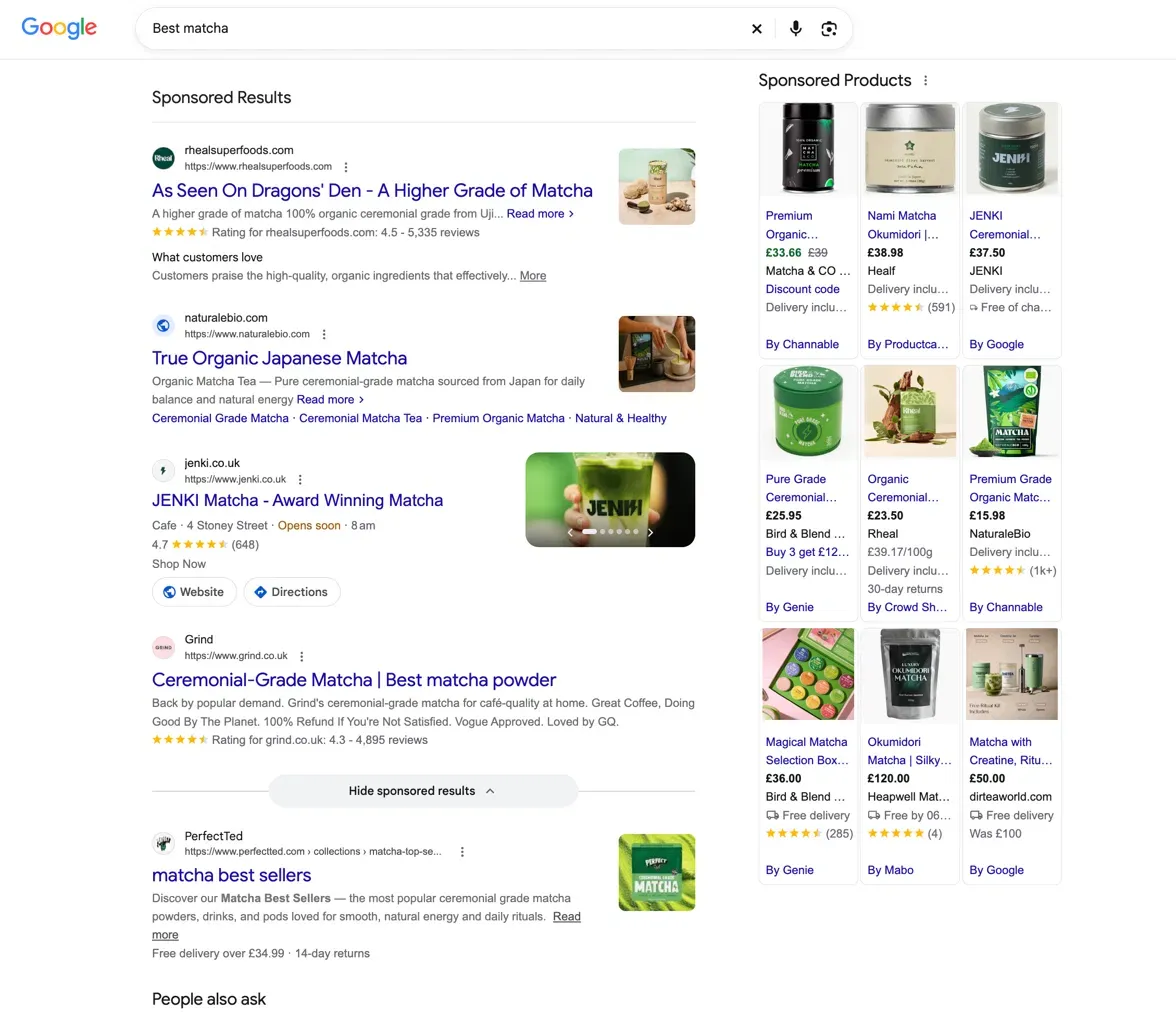
What Search and Shopping ads look like
For a product search, both formats can appear on the same page. Search ads are the text results you control with keywords and ad copy. Shopping ads pull the product image, price, delivery cost and reviews straight from your Merchant Center feed, so the quality of that feed is your ad.
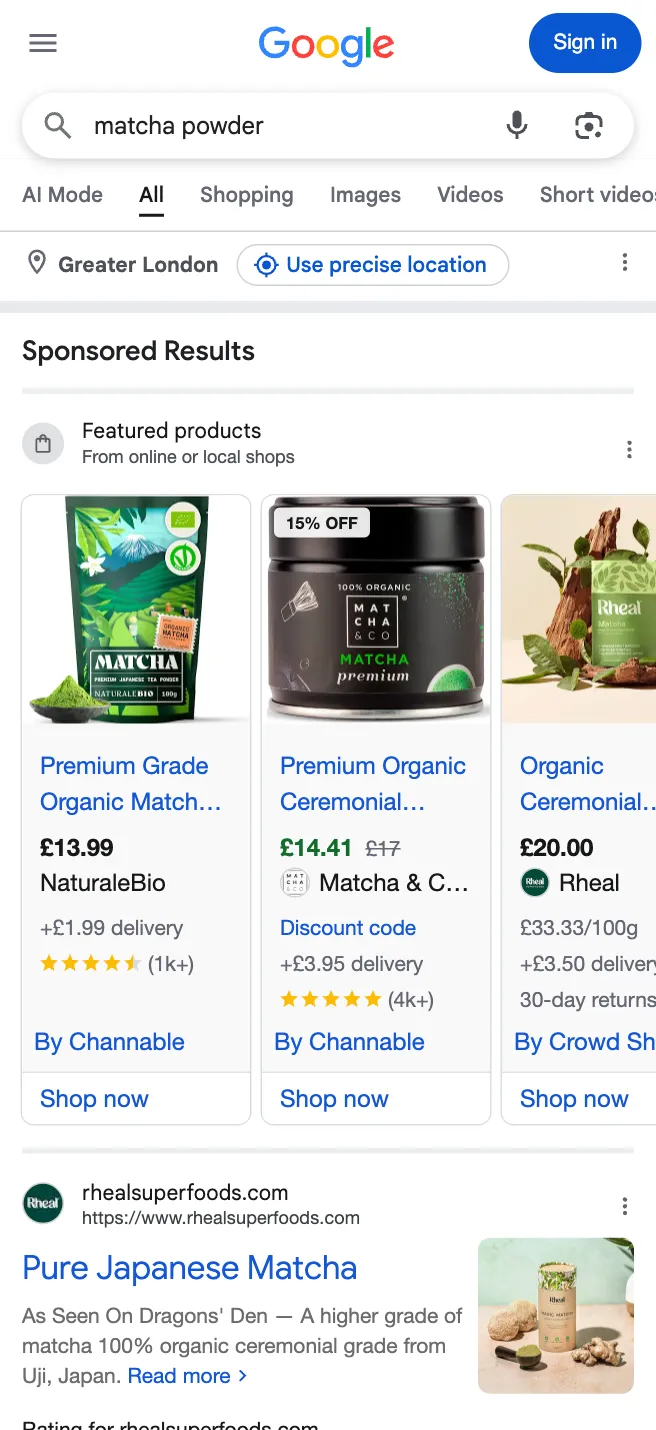
The mobile view is the one most of your customers will see. If you sell products, that is why a Shopping campaign is usually worth running alongside Search: without it, a competitor's product photo and price are the first thing a mobile searcher sees.
Setting Up Your First Campaign: A UK Checklist
Get these right before you launch and you avoid most of the money small accounts lose in their first month.
- Pick one service to advertise. Choose the one with the best margin and the clearest search demand. One focused campaign learns faster than five thin ones.
- Choose 5 to 15 keywords with buying intent. "Boiler repair Leeds" has a buyer behind it; "how does a boiler work" does not. Group them into 2 or 3 tightly themed ad groups.
- Use phrase and exact match to start. Broad match can work later, once Google has conversion data to steer it.
- Set location targeting to "Presence". In location options, choose people in or regularly in your area, not people interested in it. Otherwise someone in Spain researching your town can click your ad.
- Turn off Search Partners and the Display Network inside the Search campaign settings.
- Write ads that qualify the click. Mention your area, your speciality and, where sensible, a price signal ("from £95") so the wrong people do not click.
- Send traffic to a matching landing page, not your homepage. Same headline as the ad, phone number and form above the fold, fast on mobile.
- Add a starting list of negative keywords: jobs, salary, free, DIY, course, training, and anything else that is clearly not a customer.
- Set your daily budget at your monthly budget divided by 30.4.
- Set up conversion tracking before you spend £1 (next section).
Conversion tracking under UK GDPR
In the UK you need visitors' consent before setting most advertising cookies, and many people will decline. If your tracking is not set up for that, Google Ads will under-count your leads and optimise on partial data.
- Use a consent banner that supports Google Consent Mode v2. It passes visitors' choices to Google so your tags behave correctly, and lets Google model conversions from people who declined.
- Turn on enhanced conversions for forms, which uses hashed contact details to match conversions more accurately.
- Track calls, not just forms. For most service businesses, phone calls are a big share of leads. Count calls from ads and calls from your website.
- Decide what counts as a conversion. Mark real enquiries (form submissions, calls over a minimum length) as primary. Clicks on a phone number or email link can be useful signals, but treat them as secondary so they do not inflate your lead count.
- Give each conversion a value if you can, even an estimate based on your average customer value and close rate. It lets you judge campaigns by profit, not just volume.
7 Default Settings That Waste Small Budgets
Google's defaults are built for advertisers with large budgets and lots of data. On a small account, each of these can quietly eat a week of spend.
- Search Partners and Display Network switched on. New Search campaigns often include partner sites and display placements. The clicks are cheaper and the leads are rarer. Switch both off until Search alone is profitable.
- Location set to "Presence or interest". The default lets people outside your area see your ads if they show interest in it. For a local business that is paying for tourists and researchers. Choose "Presence".
- Auto-apply recommendations. Google can apply its own suggestions automatically, and many of them raise budgets or broaden targeting. Turn auto-apply off and review each recommendation yourself.
- Broad match before you have conversion data. Broad match lets Google decide which searches are related to your keyword. Without conversion history to guide it, that often means irrelevant searches. Start with phrase and exact match.
- No negative keywords. Every account needs a negative list from day one, and the search terms report reviewed every week to add to it.
- Ads running 24/7 when nobody answers the phone. If calls go to voicemail at night, a click at 11pm is often a lost lead. Schedule ads around the hours you can respond, or make sure your form is the main call to action out of hours.
- Treating cheap clicks as a win. Low CPC is not efficiency. In the account below, one campaign had the cheapest clicks in the account and the most expensive leads by far.
How to Tell If Your Google Ads Are Profitable
Judge Google Ads by what a customer costs you, not by clicks or even leads. Compare your actual cost per customer with the allowable cost per customer you worked out earlier. If it is lower, the campaign is paying for itself and you can think about scaling. If it is higher, fix conversion rate or targeting before adding budget.
The four numbers to check every month
- Cost per lead (CPL): total spend divided by genuine enquiries.
- Cost per customer: CPL divided by your lead-to-customer rate. Compare it with your allowable cost per customer.
- Conversion rate: the share of clicks that become enquiries. A falling rate usually points to the landing page or to keywords drifting off target.
- Search impression share: how often your ad appeared when it could have. If it is low and the campaign is profitable, you are leaving customers on the table.
If you sell online, look at return on ad spend (revenue divided by ad spend), but remember revenue is not profit. A 4x ROAS on a 20% margin product loses money once ad spend is counted.
Real numbers from a UK account
Here is one month (October 2026) from a UK service business we manage, with three service lines advertised across several cities. Figures are converted from the account currency at about ¥215 to £1 and rounded. Conversions include form submissions, calls and click events, and the business converts roughly 40% of them into paying clients.
| Segment | Clicks | Conv. rate | Conversions | Cost per conversion | Avg. CPC | Spend | Cost per client |
|---|---|---|---|---|---|---|---|
| Whole account | 3,918 | 5.5% | 226 | £17 | £0.99 | ~£3,860 | ~£43 |
| Search: brand terms | 248 | 23.0% | 57 | £4.60 | £1.07 | ~£265 | ~£12 |
| Search: non-brand | 2,322 | 7.2% | 168 | £20.60 | £1.49 | ~£3,450 | ~£51 |
| Demand Gen (Maps) | 1,348 | 0.07% | 1 | £147 | £0.11 | ~£147 | n/a |
| Performance Max | Paused | ||||||
What this shows:
- Brand terms flatter the average. The account-wide cost per conversion is £17, but brand searches (people who already know the business) cost £4.60 while new-customer searches cost £20.60. Judge growth on the non-brand line, because that is the number that has to beat your allowable cost per customer.
- The cheapest clicks were the most expensive leads. The Demand Gen campaign paid £0.11 a click, a tenth of the account average, yet one conversion cost about £147, roughly seven times the non-brand Search figure.
- Search did almost all of the work. With Performance Max paused, Search produced 225 of the 226 conversions.
- Clicks without conversions are a question, not a verdict. Two regional campaigns in this account picked up clicks with no recorded conversions in the month. The first check is not the bid; it is whether the conversion tags fire on those landing pages and whether the search terms are relevant.
One month is a short window and some campaigns were still in their learning period, so treat these figures as an illustration of the method rather than a benchmark for your sector.
When Google Ads Alone Stops Working
At some point, adding budget to Google Ads stops adding customers at a profitable cost. That is not a sign the channel has failed. It usually means the bottleneck has moved somewhere else: the website, the follow-up, or the lack of organic visibility for the same searches you are paying for.
Signs you have hit the ceiling
- Non-brand cost per customer keeps rising towards, or above, your allowable figure, even after tightening keywords.
- Impression share on your best campaigns is already high. More budget has nowhere useful to go.
- Most of your "growth" comes from brand searches, which means Ads is harvesting demand your other marketing created rather than finding new customers.
- Leads go up but customers do not. The problem is now speed of response, follow-up or sales process, not traffic.
- Your conversion rate has been flat for months because nobody owns testing the landing pages.
Connect paid search with SEO, CRM and your website
The next gains usually come from treating these as one system with one set of numbers:
- SEO for the keywords Ads has proven. Your search terms report tells you exactly which queries turn into customers. Ranking organically for them lowers your blended cost per customer over time.
- CRM and follow-up. If around 60% of leads do not become customers straight away, a simple follow-up sequence can turn some of them into customers later, without paying for another click.
- Conversion rate work on the website. Lifting a landing page from 5% to 7% conversion cuts your cost per lead by nearly 30% at the same CPC.
- One target for every channel. Paid, organic, email and the website should all be judged against the same allowable cost per customer, so budget moves to whatever is winning.
DIY, agency, or a fractional growth lead?
| Option | Usually fits when | What you get | Watch out for |
|---|---|---|---|
| Do it yourself | Ad spend under about £1,000 a month, one service, one area, and 2 to 3 hours a week to manage it | Full control and no fees | Weekly checks slipping when the business gets busy |
| Google Ads agency or freelancer | Paid search is the main growth channel and you need specialist management | Day-to-day optimisation of the ad account | Reporting on clicks instead of customers; you not owning the account |
| Fractional growth lead | Ads is working but growth has stalled across channels, and several suppliers each report a different number | One senior owner for paid, SEO, CRM and website, planned from customer value and allowable CPA | Choosing someone who advises but does not get the work done |
There is no shame in any of these. The right choice depends on where the bottleneck is, and the allowable cost per customer you calculated earlier is the fairest way to judge whoever is doing the work.
FAQs
Is £10 a day enough for Google Ads in the UK?
Usually not for testing new-customer keywords. £10 a day is about £300 a month, which at a £2 click buys five clicks a day, half of the roughly ten a day you need to learn anything within a month. It can be enough for a brand-name campaign or a very cheap local niche. Use the calculator above to find your own minimum.
How long does Google Ads take to work?
Ads can start getting clicks within hours of approval. Allow two to four weeks before you have enough data to tell good keywords from bad ones, and 60 to 90 days before judging overall return, especially if you use automated bidding, which needs time to learn.
Should a small business do Google Ads or SEO first?
Ideally both, for different jobs. Google Ads brings enquiries now and tells you which searches turn into customers. SEO takes months but keeps working without paying per click. A sensible order for many small businesses is to run Ads first, then invest in SEO for the keywords Ads has proven profitable.
Google Ads or Meta Ads for a small business?
Google Ads reaches people who are already searching for what you offer, so it usually suits service businesses and urgent needs. Meta Ads (Facebook and Instagram) reaches people based on interests and behaviour before they search, so it suits visual products and creating demand. Most service businesses should prove Google Ads first.
Does Google offer free credit for new UK advertisers?
Google often offers new advertisers a promotional credit when they spend a set amount within a set period. The amount and terms change and depend on eligibility, so check the offer shown when you create your account. Treat it as a bonus, not a reason to skip the budget maths.
The Bottom Line
Google Ads works for small businesses when the budget comes from the customer, not the bank balance. Work out what a customer is worth, decide how much of that you will spend to win one, and let that number set your maximum CPC and your monthly budget. Start with one focused Search campaign, fix the default settings, track real enquiries under UK consent rules, and judge everything by cost per customer.
When Ads alone stops moving the numbers, the answer is rarely a bigger budget. It is joining paid search up with your SEO, follow-up and website.
Want a second pair of eyes on your numbers?
Book a free 30-minute Allowable CPA & Budget Review. We will work out your allowable cost per customer, check it against your current Google Ads performance and show you where the next pound should go.
Book a 30-minute strategy call